
Discovering poems and poets
How to find new poems, poets to follow, and Rising Poets, plus browsing by category and by poetic form.
Reviewed regularly to match the current app.
Overview
Your home stream shows you the poets you already follow. Discovery is how you find everyone else — fresh poems, new voices to follow, and the poets gaining momentum this week. GS Poetry gives you a few front doors into that: Discover Poems for the writing, Discover Poets for the people, and two directories for browsing by category or by poetic form. This guide walks through each one.
Discover Poems
Discover Poems is your window onto everything being published across GS Poetry, sorted into a few simple tabs:
- New Poems — the most recently published work, hot off the page. The page opens on this tab.
- Boosted — poems their poets have chosen to boost.
- Trending — the poems drawing the most reads, likes, and comments right now.
- On the Rise — poems quietly picking up readers and momentum over the last week.
- Categories and Poetic Form — browse poems by theme or by form.
- SoulCast — poems you can listen to, read aloud by the poet.
A sidebar lets you narrow any tab by category or poetic form, and sort by most read, liked, commented, saved, or shared. There’s also a search box for finding poems by keyword.
Discover Poets
Discover Poets is the same idea, but for the people behind the verse — the fastest way to find someone new to follow. Its tabs let you explore poets by:
- New Poets — recent arrivals who have already published a poem. The page opens on this tab.
- Boosted — poets who have a boost running on one of their poems.
- Rising — poets gaining followers and engagement fastest (more on this below).
- Most Followed — the most-followed voices in the community.
- Prolific — poets with the deepest catalogs, which you can filter by category.
- Country — poets from a particular part of the world.
Every poet card links straight to their profile, where you can read their work and follow with a tap.
Rising Poets
Rising Poets is a weekly ranking of the poets gaining the most momentum on GS Poetry, surfaced on the Discover Poets page under the Rising tab. It’s built to shine a light on poets who are growing right now — not just the ones who are already established — so newer voices have a real chance to be found.
The ranking looks at recent, genuine growth signals — things like new followers, reads, and likes over the past week — and refreshes on a regular weekly schedule. You can also switch the Rising view between This Week, This Month, and All Time. There’s nothing to sign up for and nothing to configure; if your recent work is resonating, you may simply find yourself on the list.
Rising Poets rewards real engagement, not tricks — the ranking is computed automatically from how readers respond to your work. The best way onto it is the honest one: publish poems you care about, share them, and take part in the community. Momentum follows.
Browse by category
Every poem on GS Poetry lives in a category — Love, Nature, Loss, Hope, Pain, Identity, and many more. The Poetry Categories directory lists them all with a short definition of what each one means, plus an alphabet index to jump around. Open any category to read its meaning, then follow the Explore link to see the poems filed under it.
Browse by poetic form
If you’d rather explore by craft than by theme, the Poetic Forms directory is for you. It gathers forms from sonnets and haiku to free verse, villanelles, and spoken word, each with a plain-English explanation of its structure and history. Expand a form to learn how it works, then jump to the poems written in it — a lovely way to study a form before trying it yourself.
Reading a poem with Focus Mode
Once a poem is open, Focus Mode gives you the poem and nothing else — no sidebar, no stats, no comments — so a piece can be read the way it was meant to be. It’s free for everyone, whether or not you have GS Pro. Look for the glowing blue book button at the top-right corner of the poem (on a phone it says Focus Mode):
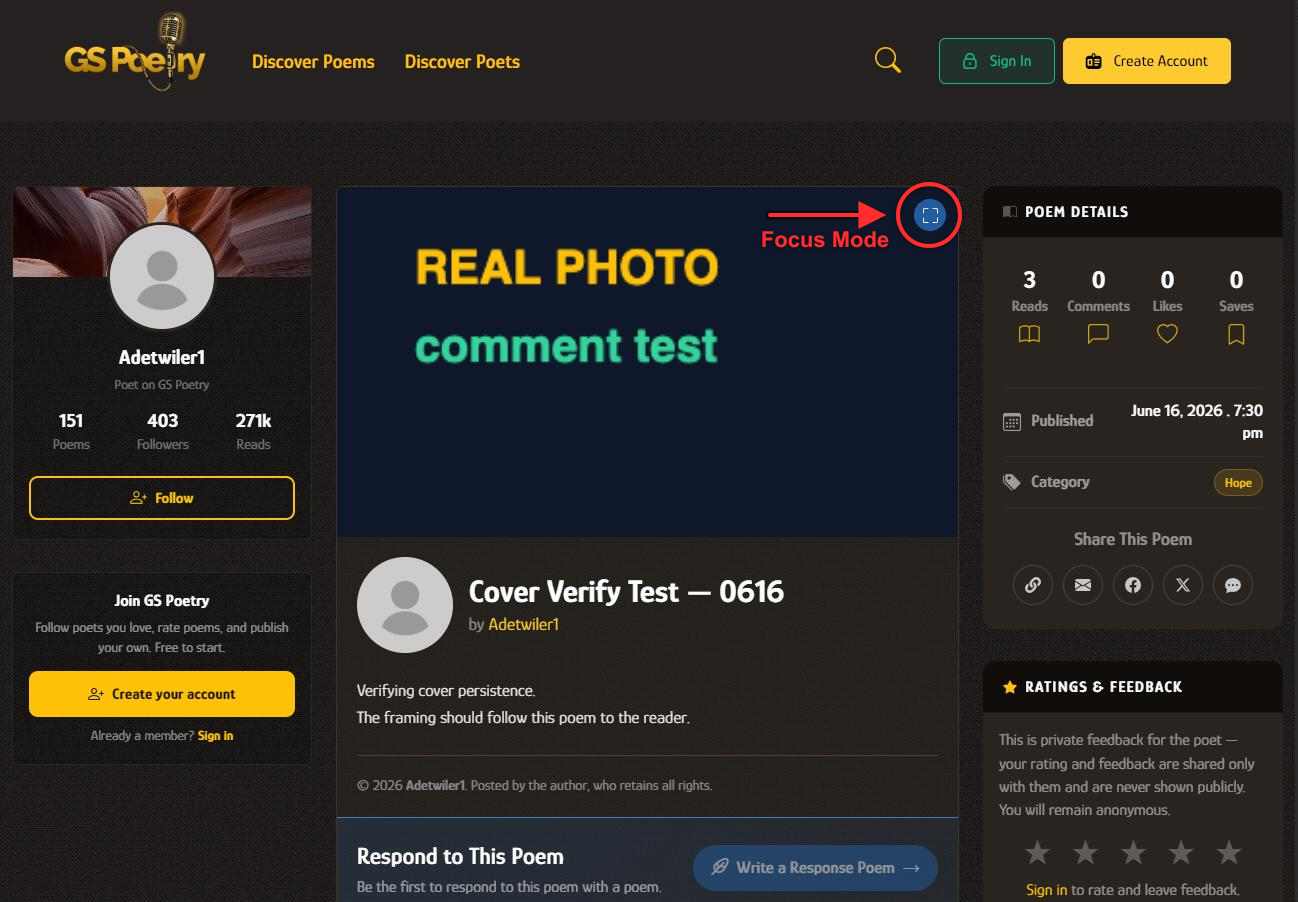
- To enter — click/tap that button, or just press F anywhere on the poem page.
- To leave — press Escape, and you’re back exactly where you were.
- Text size — five sizes are available while you read, and GS Poetry remembers the one you picked for every poem you open afterwards.
Focus Mode is a reading tool, so it appears on published poems only — your own unpublished drafts don’t have it.
Related
Discovery is about finding new voices; your home stream is where the poets you follow show up day to day — see Understanding the stream for how the two fit together. Still have a question? Contact support.